Since 2003 · Updated September 2026 · Steam Deck: OLED or LCD?
Steam Deck · Canada · 2026

Steam Deck: if your model has factory anti-glare glass, a glossy protector undoes what you paid for

Two things make the Steam Deck different from a phone. The screens are not the same size across models, and some units ship with factory etched anti-glare glass — where the usual "buy glossy for clarity" advice is exactly backwards.

Steam DeckCanada
6 verified productswww.amazon.ca
Why this page exists: The standard advice is that glossy protectors preserve clarity. On an etched Steam Deck it destroys the anti-glare property the buyer specifically paid extra for.
The inversion

Etched glass is a feature, and glossy protectors remove it

Valve has offered etched anti-glare glass on higher-tier Steam Deck configurations. It is a premium option: the glass surface is chemically etched to diffuse reflections, which matters a great deal on a handheld used outdoors, on a train, or under overhead lighting.

If you have one of those units and fit a standard glossy tempered glass protector, you have just covered the anti-glare surface with a mirror. The etching is on the glass underneath; light now reflects off the new glossy layer on top, and the property you paid extra for is gone entirely.

This inverts the normal advice. On almost any other device, glossy is the default because it preserves clarity and matte costs sharpness. On an etched Steam Deck, a matte or anti-glare protector is the one that preserves the device as designed — or, better, fit nothing and leave the factory etching exposed.

Check first

Which Deck do you have?

Screen size differs between models, and this alone makes protectors non-interchangeable. The LCD models and the OLED models do not share a display size, so a protector cut for one will not sit correctly on the other. Buy for your specific model, not for "Steam Deck".

Check whether your glass is etched. The simplest test is to look at a reflection: hold the powered-off Deck under a bright light. A glossy screen gives you a sharp mirror image; an etched screen gives a soft, diffuse haze with no clear outline. Your original order confirmation or the configuration you bought will also tell you.

What to fit

By configuration

Etched anti-glare glass: ideally nothing. If you want scratch protection, fit an anti-glare or matte protector so the diffusion is preserved. Never fit glossy.

Standard glossy glass: a normal tempered glass protector is fine, and this is the straightforward case. If you play outdoors, an anti-glare protector is worth considering — it gets you closer to the etched experience.

Either way: the Deck is a handheld with a large flat face, carried in a bag with cables and cards. Scratch risk is real, and the screen is not a trivial repair.

Fitting

Why installation is harder here than on a phone

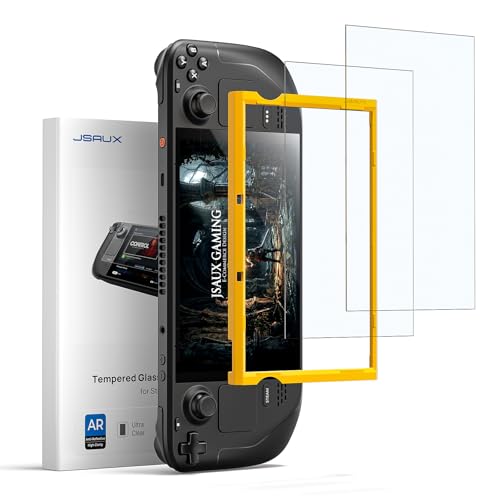
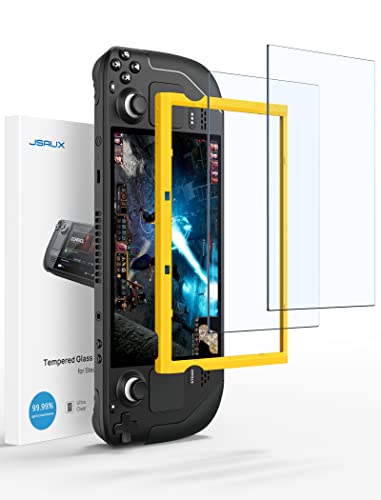
The Deck's screen is considerably larger than a phone's, and larger sheets are harder to align and far more prone to trapping dust. A protector with an alignment frame is worth more here than on any phone.

The recessed bezel helps with alignment but makes squeezing out bubbles harder, since you cannot easily work them to an edge. Fit in a steamy bathroom after a shower to keep dust down, and take longer over it than you would on a phone.

At a glance

What to fit, by configuration

Your screenGlossy protectorAnti-glare protectorBest option
Factory etched anti-glareCancels the etching — avoidPreserves diffusionNothing, or anti-glare
Standard glossyFine — the normal caseAdds outdoor readabilityEither, by preference
Checked against Amazon.ca

Options that fit the advice above

Prices change daily, so the price and availability that count are always the ones shown on Amazon once you follow the link. Each item was checked individually against Amazon.ca before publication — but read the guidance above first, because on this page the right answer is sometimes to buy nothing.
Affiliate disclosure: As an Amazon Associate, Screen-Protectors.com earns from qualifying purchases. It costs you nothing extra and does not influence the order or the content of our recommendations.
Other specifics

More device-specific guidance

FAQ

Frequently asked questions

Can I use the same screen protector on the LCD and OLED Steam Deck?

No. The models do not share a display size, so a protector cut for one will not sit correctly on the other. Buy for your exact model rather than for "Steam Deck" generically.

How do I tell if my Steam Deck has etched anti-glare glass?

Hold the powered-off screen under a bright light. Glossy glass gives a sharp mirror reflection; etched glass gives a soft diffuse haze with no clear outline. Your original configuration or order confirmation will also say.

Should I put a glossy protector on an etched Steam Deck?

No. The etching is on the glass underneath, so a glossy layer on top reflects light and cancels the anti-glare property entirely. Fit an anti-glare protector or nothing at all.

Is fitting a Steam Deck protector harder than a phone?

Yes. The sheet is much larger, which makes alignment and dust control harder, and the recessed bezel makes working bubbles out to an edge more difficult. Buy one with an alignment frame and take your time.